
Getting Things Done with Obsidian Tasks
I've tried a lot of task management systems, however reading David Allen's Getting Things Done changed how I thought about this. I found that the process fit perfectly with Todoist, which they themselves promote in their articles as well as project templates within the app itself.
But I didn't want my task management living in the cloud. My notes already lived in Obsidian, so I looked into whether I could bring GTD in there too.
This article takes you through my Obsidian Tasks x GTD setup, so that you can try this for yourself. If you'd like to simply get started, then there's a link to an example repo template at the bottom.
What is "Getting Things Done"?
Getting Things Done is a process which helps you to decide which tasks to work on next. It's built on the concept that your brain is for having ideas, not holding them. Rather than picking a specific project to focus on at any one time, it encourages you to think in terms of the following priorities:
- Context
- Time available
- Energy available
- Priority
A project is defined as "any desired result that requires more than one action step". And every project should have at least one defined next action.
When tasks are created, we should keep the process lightweight and initially add them into an "Inbox". This is the capture stage. Later, we can then process and clarify them by adding things like labels and due dates.
Once a week, a Weekly Review brings everything together. You can check that your projects are still relevant, nothing has slipped through the cracks, and that every project has a next action.
Obsidian + Obsidian Tasks
If you haven't heard of Obsidian before, it's a local-first note taking application, which allows the linking between your notes to help build up a Personal Knowledge System.
Obsidian Tasks is a community plugin which collates all uses of checkboxes throughout your Obsidian vault, and ties them together into a task management system.
GTD concepts applied to Obsidian
Capture
When using Obsidian, and the plugin Obsidian Tasks, you can add a checkbox anywhere in your vault and Obsidian Tasks will pick up on it.
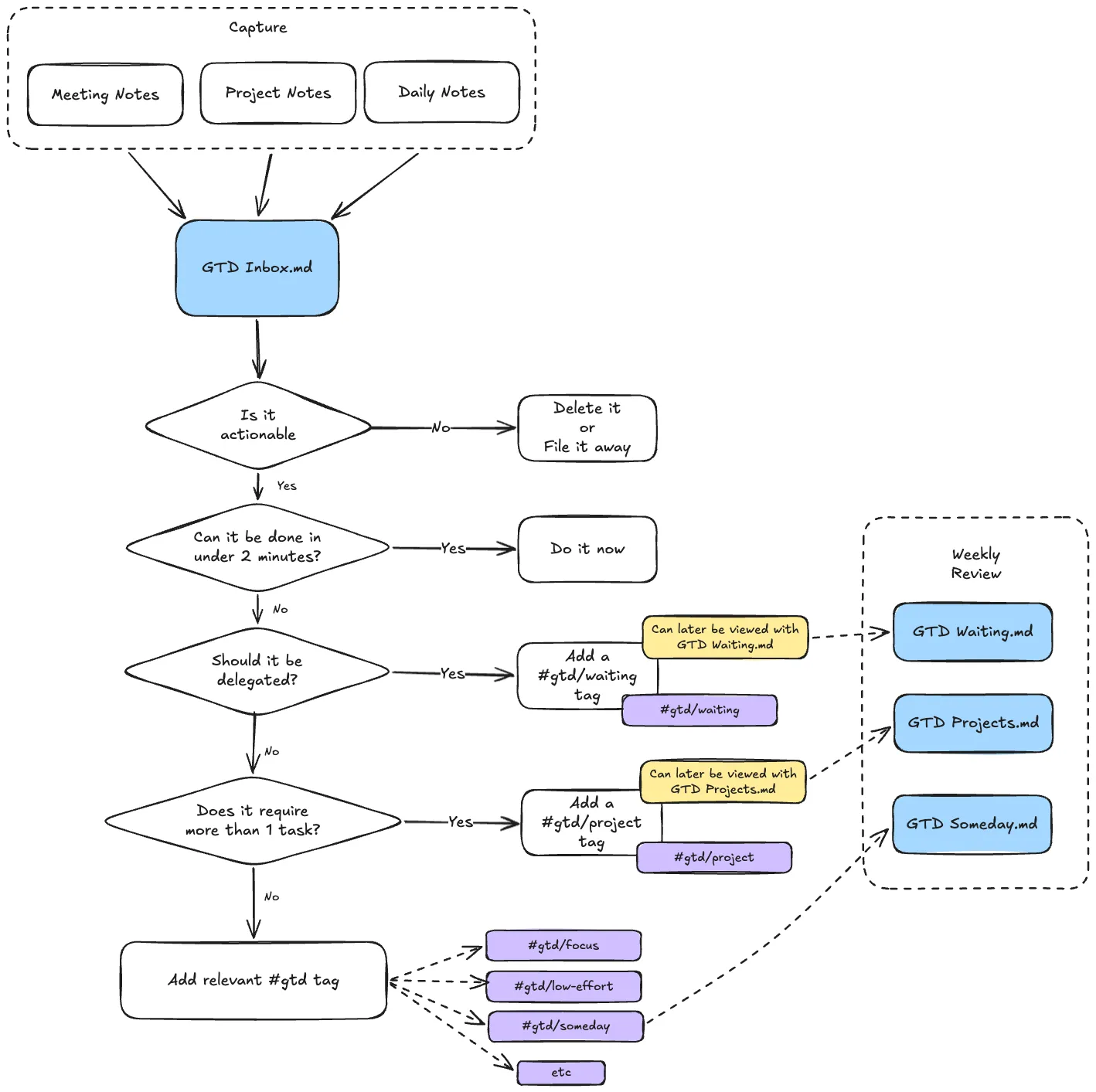
Capturing tasks should be as simple as possible, and therefore my Inbox approach is any checkbox which has been added but does not have a #gtd tag attached to it.
For example:
- [ ] Type up meeting notesThese are then displayed with the following Obsidian Tasks query:
GTD Inbox.md:
not done
NOT (tags include #gtd)
This means whether I'm recording actions as part of a specific meeting note, or just adding them to my Daily Note, I can always find a concise list in my GTD Inbox, ready for clarifying and organising.
Clarify
Once tasks are in the inbox, the next step is to work though them and decide what to do with each one.
- Is it actionable? - If not, then archive it, or delete it
- Can it be done in under 2 minutes? - Do it now.
- Should it be delegated? - Add a
#gtd/waitingtag
Once a task has been through this process, it's ready to be organised.
Organise
I then organise the remaining by adding #gtd tags to add context. For example:
#gtd/focus- Tasks requiring sustained concentration#gtd/low-effort- Easy, routine tasks for when you're tired#gtd/quick- Tasks that don't take too long#gtd/waiting- Things delegated to others that you're tracking#gtd/project- It's a large task which is going to require multiple tasks to complete it.
I use the #gtd prefix for all these labels so as not to pollute the rest of the vault's tags. They are all nicely contained with that one space.
Reflect
The Reflect step is about regularly reviewing your system to ensure it stays current, complete, and trustworthy. In Obsidian, this means periodically checking your GTD views to make sure nothing has slipped through the cracks.
Weekly Review
As part of the reflection stage, it's also common to have a weekly review.
A simple weekly review query can surface all active GTD tasks grouped by context:
not done
group by tags
Engage
With your tasks now organised, you can query based on your current situation.
Short space of time
not done
tags include #gtd/quick
Time for deep work
not done
tags include #gtd/focus
Recommended Obsidian Community Plugins
Obsidian Tasks Goes without saying!
Templater
I use Templater to quickly insert a #gtd tag using CMD + §. It makes it much easier to add a tag during the Clarify and Organise steps:

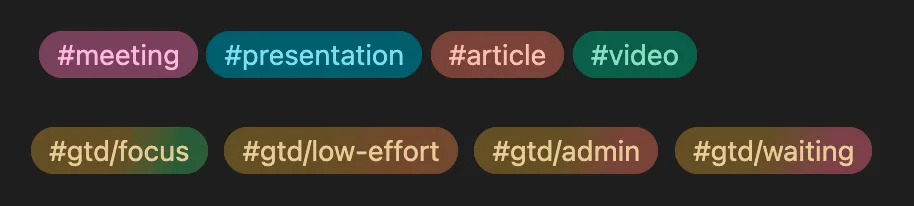
Colored Tags This one isn't critical, but Colored Tags will help differentiate your different GTD tags from non-GTD tags, and also provide slight differences between the contexts:
Current Drawbacks
No quick-add function
Unlike dedicated task management apps such as Todoist, there is no quick-add shortcut for jotting down tasks. My process is to open up the current daily note (via a keyboard shortcut) and then add it to the end of that. However, it still doesn't feel as quick and easy as alternative task management systems.
Tag editing takes more time
During the Clarify and Organise stages, adding the #gtd tags isn't as smooth as I'd like it to be. We have 2 options: either go to the original note, which takes us away from the current view we're on. Or we can add the tag using Obsidian Task's custom edit dialog - however this doesn't have autocomplete functionality.
Example Obsidian Vault
I've put together an example Obsidian Vault on GitHub, which you can download and try out for yourself:
https://github.com/curtiscde/obsidian-tasks-gtd
Do you have an offline task management system? If so, I'd love to hear about it in the comments below. Thanks for reading!


