
Using Jev to triage GitHub issues
I've been hearing a lot about Jev recently, so I thought I'd give this new AI model a go and see how it fares. Below I introduce Jev, and then show how it can triage 100s of GitHub issues in seconds, for pennies.
What is Jev?
Jev is a new AI model from TypeSafe that has blown up recently. It has two big selling points:
- It's quick: a median of about 330 ms per decision in my tests
- It's cheap: $0.042 per million input tokens, and output is free. Triaging every issue in this post cost less than 10 cents
TypeSafe calls Jev a "System One" model. The name comes from System 1 thinking, the fast, intuitive mode of thought popularised by Daniel Kahneman in Thinking, Fast and Slow, which I'm actually reading at the moment.
Unlike a standard LLM, Jev doesn't write conversational text responses. You give it some structured input and a set of questions, and it answers each one in exactly the shape (schema) you asked for, with probabilities attached.
Jev is a probabilistic decision maker
There are three types of question you can ask Jev:
Noul (yes or no): Jev returns the probability that the answer is yes, such as
0.88, rather than a plain true or false. "Is this email spam?" for example is a Noul.1being very likely spam, and0being not spam at all. In the AI SDK, it's writtentype: 'boolean'.Choice (pick one): Jev picks one option from a list you provide, and returns a probability for every option. Asked what kind of email a payment invoice is, it might answer
Finance 0.82, Marketing 0.12, Personal 0.04, Work 0.02.Score (rate on a scale): you define a scale of between 2 and 10 ordered levels, and Jev returns a position on it, starting at 0 for the first level. For example, asking it to rate an email's urgency with four levels ("Not urgent", "Soon", "This week", "Drop everything"), a score of
2.6lands between "This week" and "Drop everything".
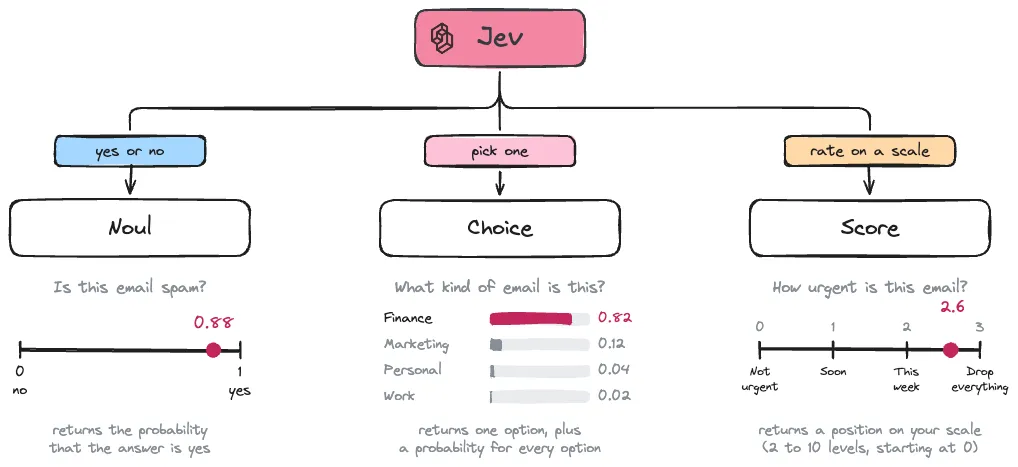
You can ask several questions at once, and Jev answers them all in a single request, so adding more questions barely costs any time.
Triaging GitHub Issues using Jev
Jev is at its best on quick, repetitive decisions where code acts on the answer, such as flagging an email as spam or urgent. That is what makes it great for triaging GitHub issues.
Matt Pocock's skills repo has blown up in popularity recently (the 15th most starred repo of all time, at the time of writing!), and it has amassed a lot of issues in that short space of time. It has over 500 open issues, almost none of them labelled. Which makes it an ideal test of Jev's speed and cost.
Vercel setup
Jev is available through Vercel's AI Gateway, so I started by creating a Vercel account, adding a card, buying $10 of credits and creating an AI Gateway API key.
There are two gotchas I encountered:
- The free credits Vercel gives you don't cover Jev, so you need paid ones.
- Even after paying, my requests were refused with a "free tier" rate-limit error for about two days before the paid tier kicked in. If you see
429 No access to this model at this time, it may just need time!
What we ask Jev
For each open issue, Jev reads the title and description, and answers five questions in a single request.
As these are issues on an AI Skills repo, the questions I'm asking it are:
- Which skill is this regarding?
- Which category does this fall under?
- What are the next steps?
- How likely is it to be turned down?
- What is its impact?
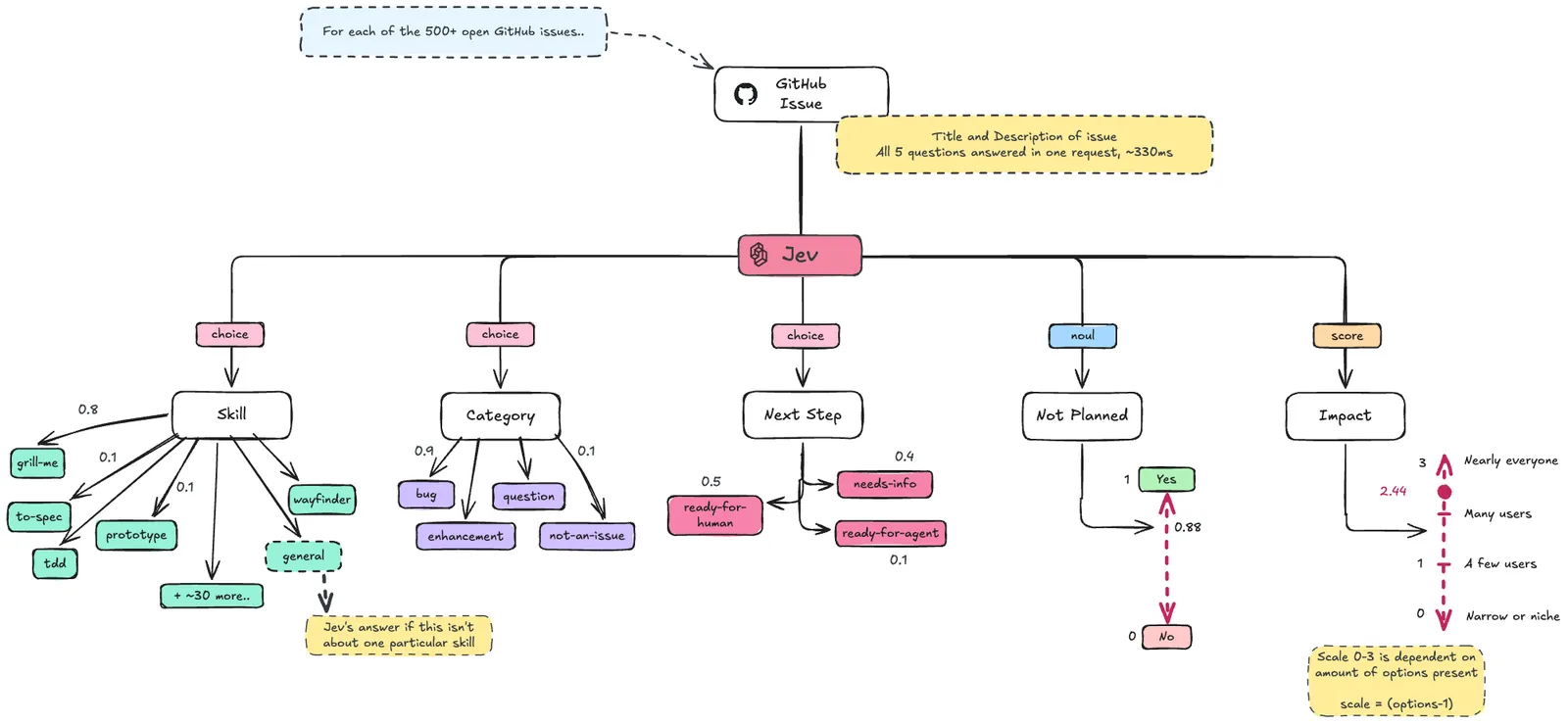
A few details that the diagram doesn't show:
- The skill options come from the repo itself. Each of its 37 skill folders becomes an option, described using the skill's own description, plus
generalfor everything else.- Before running Jev, all the skills are pulled directly from the repo and stored using this script:
fetch-issues.ts
- Before running Jev, all the skills are pulled directly from the repo and stored using this script:
- "Not planned" means the maintainer closing the issue without acting on it: turning it down as out of scope, a duplicate, or a deliberate no. Issues that get fixed are closed too, but those don't count.
Calling Jev
All the Jev logic comes down to one function call. The AI SDK's experimental_evaluate takes the issue as state, and each question as a plain object. Here are the five questions from the diagram as code. In the repo, this is split into a few small functions in lib/jev.ts, but the questions and state are exactly the same.
import { experimental_evaluate as evaluate } from 'ai';

const { answers } = await evaluate({
  model: 'typesafe-ai/jev',
  state: {
    repository: 'mattpocock/skills: a collection of skills (reusable instructions) for AI coding agents',
    title: issue.title,
    body: issue.body?.slice(0, 4000) ?? null,
  },
  questions: {
    category: {
      type: 'choice',
      instructions: 'What kind of issue is this?',
      criteria: {
        bug: 'Something in a skill is broken or behaves wrongly',
        enhancement: 'A request for a new skill, feature or improvement',
        question: 'Asking for help, clarification or how to use something',
        'not-an-issue': 'Opened by mistake, a test, or not about the project',
      },
    },
    skill: {
      type: 'choice',
      instructions: 'Which skill in the repository is this issue about?',
      criteria: {
        ...Object.fromEntries(skills.map((s) => [s.name, s.description.slice(0, 300)])), // 37 skills from the repo
        general: 'The repository as a whole, several skills at once, or a skill that does not exist yet',
      },
    },
    nextStep: {
      type: 'choice',
      instructions: 'What should happen next with this issue?',
      criteria: {
        'needs-info': 'The maintainer needs more information from the author before anyone can act',
        'ready-for-agent': 'Clear and well scoped enough for an AI coding agent to implement',
        'ready-for-human': 'Needs human judgement, design decisions or discussion',
      },
    },
    notPlanned: {
      type: 'boolean', // a Noul
      instructions:
        'Will the maintainer close this issue without acting on it (out of scope, a duplicate, or a deliberate no)?',
    },
    impact: {
      type: 'score',
      instructions: 'How many users of the repository does this issue affect?',
      criteria: ['Narrow or niche use case', 'A few users', 'Many users', 'Nearly everyone who uses this skill'],
    },
  },
});
The state is what Jev reads about each issue. As well as the title and body, it gets a one-line description of the repository, so it knows what a "skill" means here. The body is capped at 4,000 characters as a safety limit, so one very long issue can't make a request much bigger than the rest. It only affects about 1 in 10 issues.
There's no client to set up: the model ID 'typesafe-ai/jev' is sent through Vercel's AI Gateway, which picks up your AI_GATEWAY_API_KEY from the environment.
Here's what came back for one real issue, "grilling: later rounds refer to earlier questions by number only, forcing scroll-back" (trimmed for readability):
answers.category;   // { choice: 'enhancement', probabilities: { enhancement: 0.99, bug: 0.01, question: 0, 'not-an-issue': 0 } }
answers.skill;      // { choice: 'grilling', probabilities: { grilling: 0.96, 'writing-for-agents': 0.03, 'grill-me': 0.01, … } }
answers.nextStep;   // { choice: 'ready-for-agent', probabilities: { 'ready-for-agent': 0.92, 'ready-for-human': 0.08, 'needs-info': 0 } }
answers.notPlanned; // { probability: 0.27 }
answers.impact;     // { score: 2.44, probabilities: { 0: 0.07, 1: 0.1, 2: 0.15, 3: 0.68 } }
Reading them back:
- Category: Jev is 99% sure it's an
enhancement, which it is: the author is asking for the grilling skill to work differently. - Skill: 96%
grilling. The small chance it gave togrill-memakes sense, as the two skills have very similar names. - Impact:
2.44sits between "Many users" (2) and "Nearly everyone" (3). The probabilities show why: most of the weight (0.68) is on the top level.
My favourite part is the types. Because the criteria keys are bug, enhancement, question and not-an-issue, TypeScript knows answers.category.choice can only be one of those four strings, so a typo like 'enhancment' is a compile error rather than a silent bug.
Demo app
So that we can see how fast Jev really is, I built a small Next.js app that works through every open issue and shows Jev's answers as they arrive.
Speed test
Alongside the app, I ran the same Jev call from the command line over every issue in the repo, open and closed, which came to 862 issues.
| Metric | Result |
|---|---|
| Issues triaged | 862 |
| Total cost | $0.097 (2.3 million input tokens) |
| Cost per issue | about $0.0001 |
| Median time per issue | 330 ms |
| 95% of issues answered within | about 1 second |
Sending 20 requests at a time, Jev got through the issues at around 32 a second: 838 of them in just under 26 seconds. (The other 24 were done earlier, while I was testing.)
To put the cost into perspective, that's roughly $0.01 for every 100 issues! Each request was around 2,700 tokens, and most of that is the descriptions of Matt's 37 skills.
How accurate was Jev?
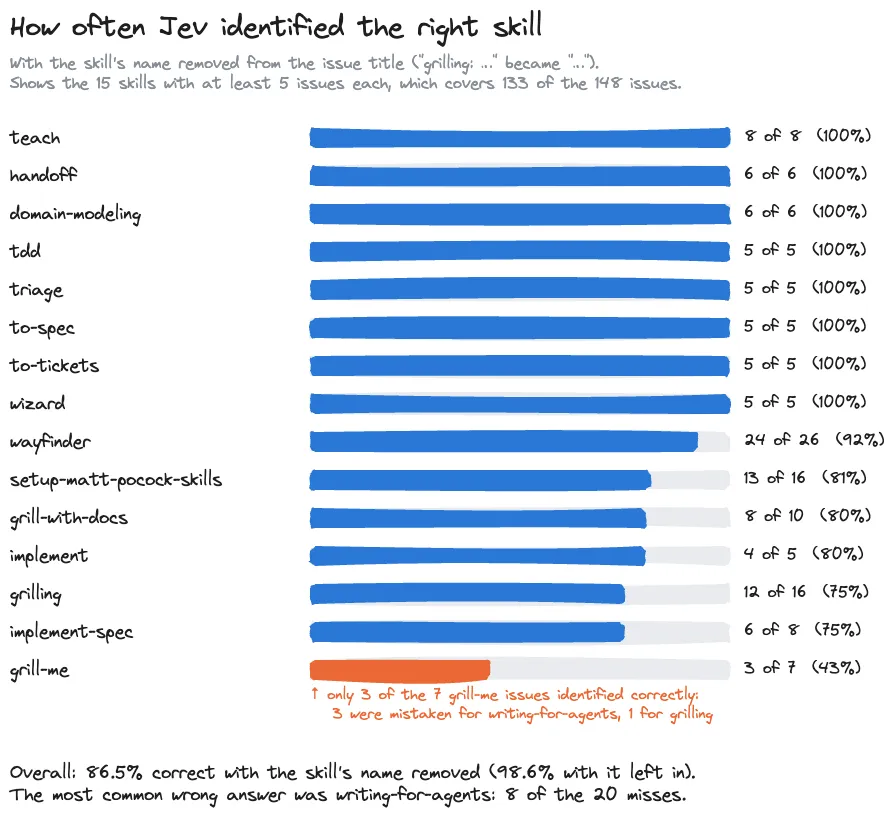
To check Jev's answers, I used the issue titles. Many start with the skill's name or the type of issue, such as "grilling: ask fewer questions" or "bug: …", which gives a ready-made answer key for 148 and 82 issues respectively.
The catch is that Jev can see that answer in the title too, so I asked again with the prefix removed:
| Answer visible in the title | Answer removed (fair test) | |
|---|---|---|
| Skill (148 issues) | 98.6% | 86.5% |
| Category (82 issues) | 98.8% | 92.7% |
The category check is lopsided, though. 72 of the 82 prefixed issues are enhancements, so the 92.7% mostly shows that Jev spots enhancements well. It got 4 of 5 bugs and all 5 questions right, but that's too few to say much.
Without the prefix, Jev picked the right skill out of the 38 options 86% of the time. Most of its mistakes were close calls between skills with similar names, such as grill-me and grilling:
Current Drawbacks
It can be tricked
Prompt injection is a known weakness of Jev. Anyone can open an issue, and a hidden HTML comment telling the triage system what to answer can sway the result. That matters most for ready-for-agent: applied automatically, it could hand a malicious issue straight to an AI coding agent. I'd use Jev's labels to sort and suggest, and keep a human in the loop for anything that triggers further work.
It struggled with "not planned"
Jev identified skills and categories well, but was barely better than chance at predicting which issues the maintainer would decline.
It isn't deterministic
Like most AI models, Jev can give a different answer to the same question. Asked about one borderline issue five times, it said not-an-issue four times and enhancement once. Clear-cut issues get the same answer every time, so the probabilities are a good guide to what needs a second look.
Taking it further
This triaging process could be moved into a GitHub Action, so that every new issue is triaged the moment it's opened. The Action would run whenever an issue is created, ask Jev the questions, and then update the GitHub Issue on the fly.
Based on the findings, I would drop 2 of the questions. "Not planned" was barely better than chance, and it wasn't possible to test "next step" answers.
Try it yourself
The code for this post is on GitHub, including the live triage page and the scripts used to produce the numbers above:
https://github.com/curtiscde/jev-issue-triage
You'll need an AI Gateway API key with paid credits. There's also a fake model you can switch on to try the page for free.
If you have any questions or comments, please feel free to leave them in the discussions box below!


